














Getting started
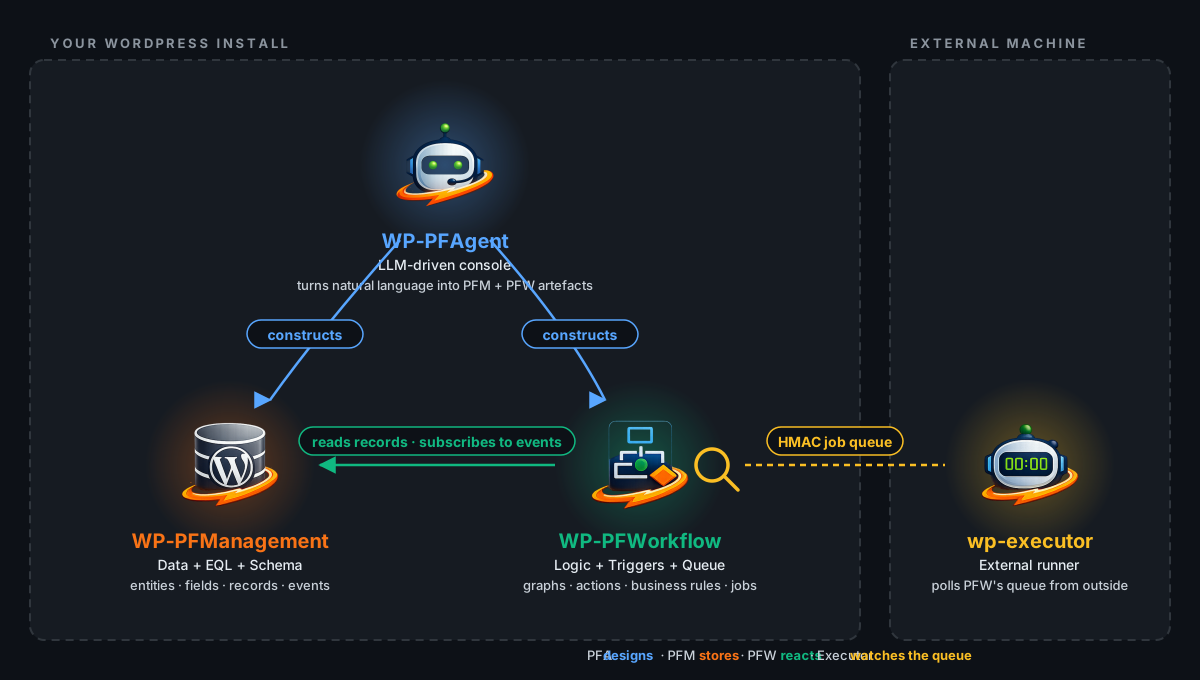
Welcome to the Setyenv documentation. This site documents the Setyenv suite — three commercial WordPress plugins plus an open-source companion — that together work as a self-hosted alternative to Zapier + ChatGPT + ServiceNow:
- WP-PFWorkflow — the visual automation engine.
- WP-PFAgent — the natural-language AI agent that drives the engine.
- WP-PFManagement — the structured-data layer to build apps on top.
- wp-executor — the open-source host-side runner (separate binary).
The commercial plugins are sold separately and each one provides value on its own. They compound when you install them together — the Agent understands the Engine's REST API, and Management's record events become first-class Engine triggers.
Where to start
- You want to run it: register, download from your account (or pull the Docker image) and follow the Getting started page of each plugin in the sidebar. No key is needed — that is the Community Edition. An Enterprise key, when you have one, goes in once for both plugins.
- You are evaluating before buying: read the overview for each product and the Why three plugins, one suite page.
- You are a developer integrating with the portal: see Portal → REST API.
What this documentation covers
Every product page on this site is auto-extracted from the source code of the plugin it documents. There is no separate "documentation project" that drifts from reality — when a node, tool or field changes, its documentation moves with it in the same commit. When a release ships, its documentation ships with the same .zip.
For each product you will find:
- Overview — what the product does, who it's for, what it replaces.
- Getting started — install, your first run.
- Concepts — the vocabulary you need to read the rest of the docs.
- Reference — every node / tool / field individually, with inputs, outputs and at least one example.
- Integrations — one page per third-party service the product talks to.
- Troubleshooting — common errors with their actual cause + fix.
- Changelog — every public release with breaking changes flagged.
Conventions used in this site
- Code blocks are real, copy-paste-able snippets. If something in a snippet is a placeholder we wrap it in
<...>. - Callout boxes mark notes (blue), warnings (orange) and dangers (red).
- Screenshots are taken from a real install in English. If your site is in another language the text in the screenshot will look different but the layout matches.
- The sidebar on the left is the full index of everything. Use the filter box at the top to jump.
Need help beyond the docs?
Open a support ticket from your customer dashboard. We respond within 2 business days. Critical security issues are prioritised. See the Support page for the SLA detail.