Setyenv™

Your own ServiceNow, Zapier, and ChatGPT plugins. Inside WordPress. No SaaS in the middle.

Three plugins that work together — plus an open-source runner: a visual automation engine, an AI agent that drives it in natural language, and a low-code platform to build apps on top. Self-hosted, so nothing of yours leaves your server. Free for personal use, and complete: the Community Edition is the same code as Enterprise, with every feature, no restrictions and no key. Build a real Dev → Pre → Pro chain — Sync pushes your work up, Clone brings production's shape down. It is on Docker Hub too, free: one command and the whole suite is running. Only commercial use needs an Enterprise subscription.

Why three plugins and a runner, one suite

Each one solves a specific problem. Together, they replace three separate SaaS subscriptions and stop your data from leaving your server.

Workflows that actually run

Drag-drop visual editor, plus a real execution engine: queue, retry, replay, timeline, idempotency. Not a diagram-only tool.

An agent that takes orders

Bring your own LLM keys. The agent reads your setup, drafts a workflow from a sentence, and asks for confirmation before any side effect.

Your data stays in your DB

Everything runs inside your WordPress: workflows, executions, credentials, telemetry. No external dashboards, no per-execution pricing, no vendor lock-in.

Run it on your own machine

wp-executor runs your workflow events on your own machine and your own tools — shell, scripts, files, your local integrations — so automation reaches beyond WordPress into your own environment.

Three plugins and a runner

Each one ships today. Run them free as the Community Edition, or on one Enterprise subscription for commercial use — they amplify each other, but each one stands on its own.

WP-PFWorkflow

WP-PFWorkflow™ — the engine

Build automations visually and run them on your WordPress. Triggers from WooCommerce, forms, LMS, CRM, SEO and core WordPress. Nodes covering data, content, users, comments, media, taxonomy, email, webhooks, and AI calls.

  • Nodes across categories — WooCommerce, forms, LMS, CRM, SEO, AI, developer, more
  • Real execution: queue, retry with exponential backoff, replay, structured timeline, idempotency locks
  • AI nodes connect to OpenAI, Anthropic, Gemini, DeepSeek, Qwen, plus any OpenAI-compatible endpoint — your keys, your bills
  • Public REST API the agent consumes, plus generic webhook in/out for anything else
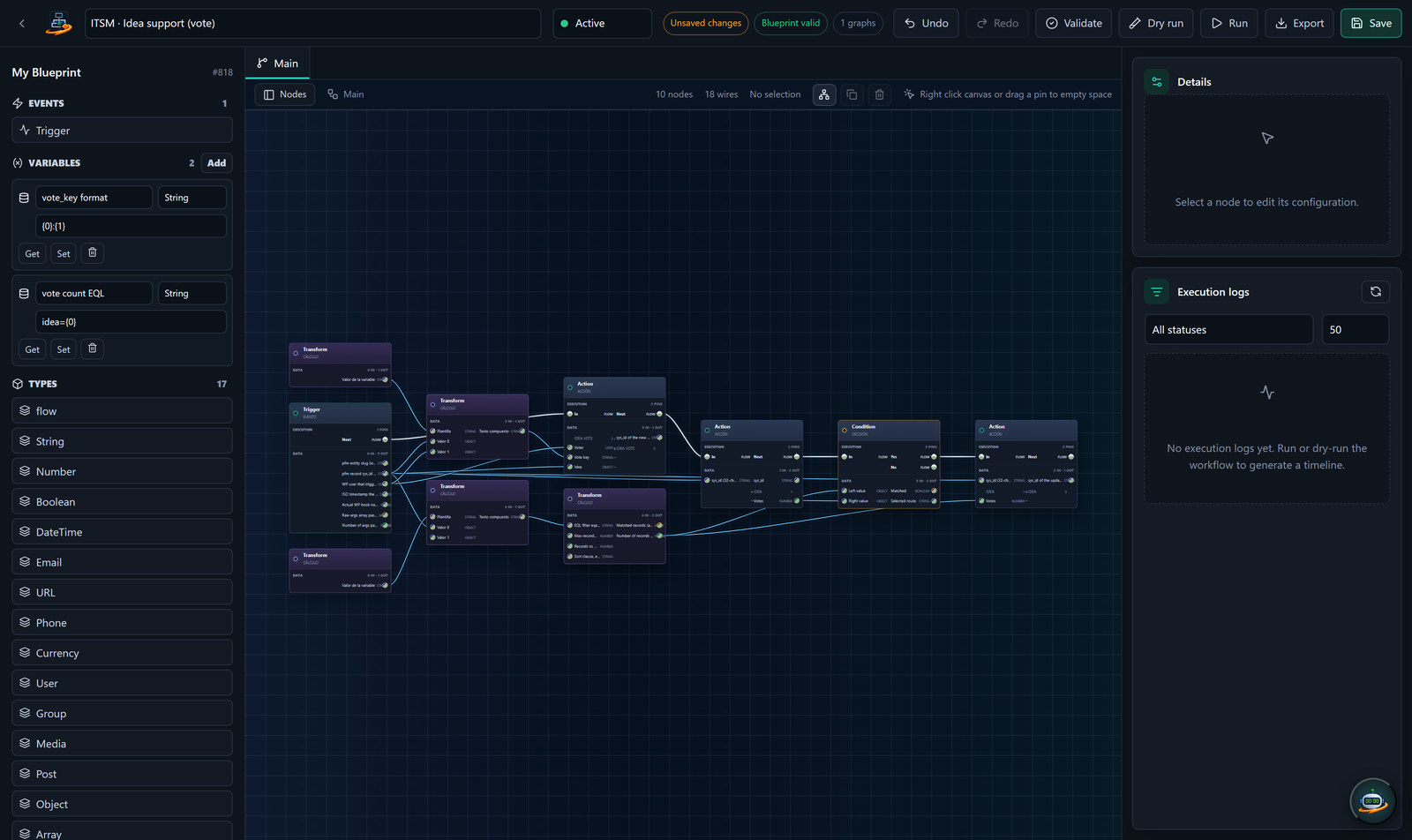
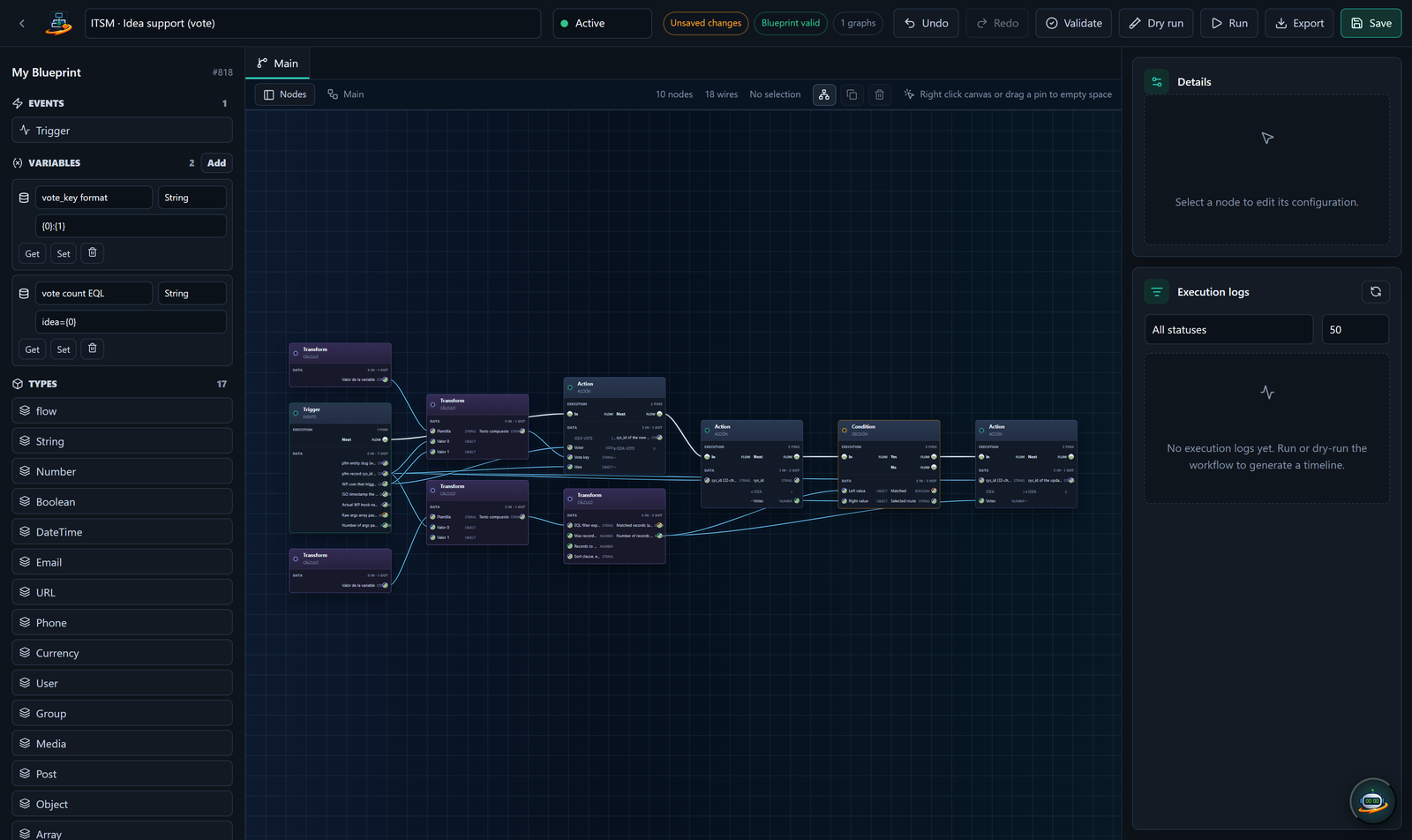
WP-PFWorkflow visual editor
WP-PFAgent

WP-PFAgent™ — the conductor

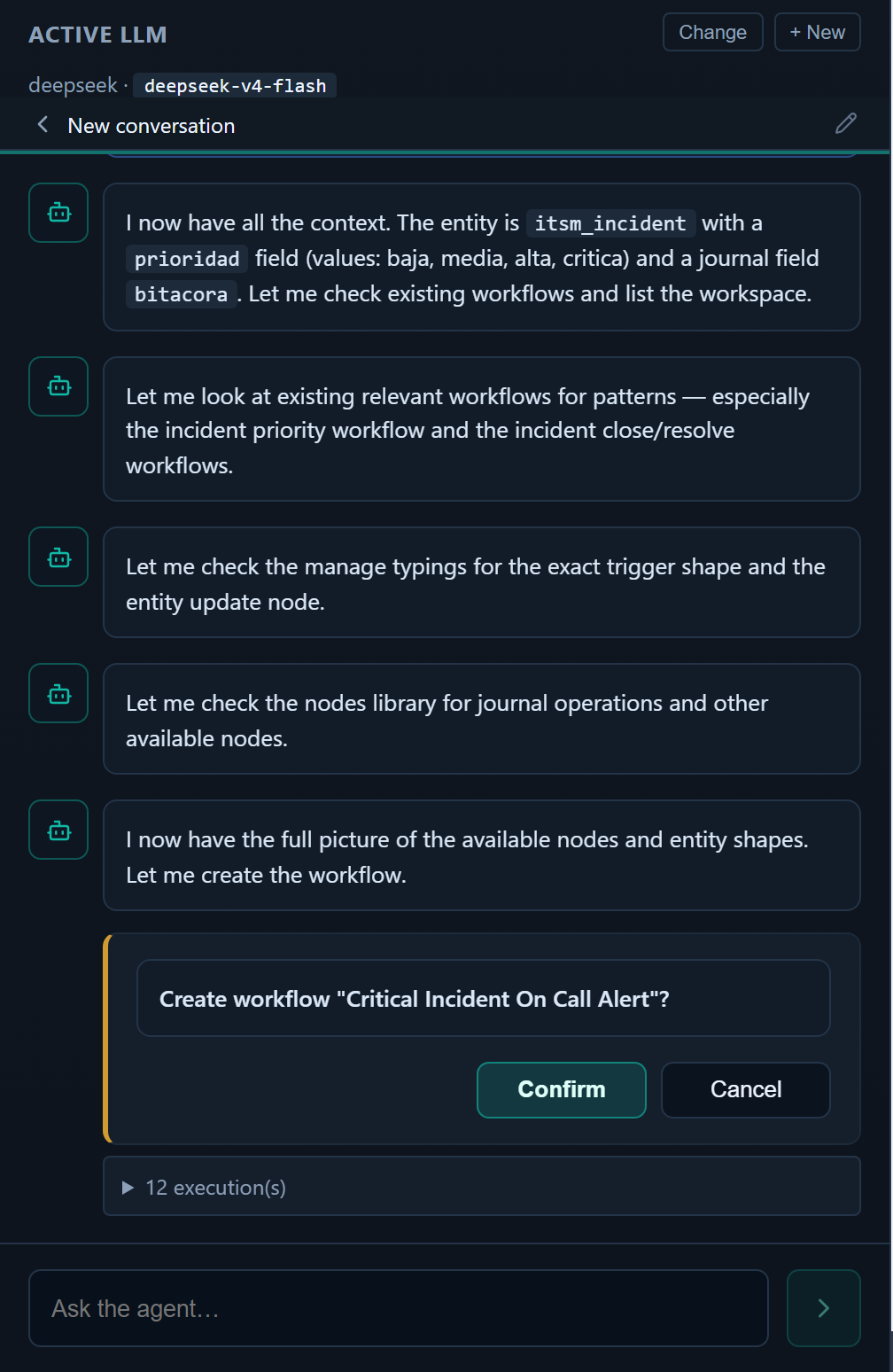
A natural-language agent built on top of the Workflow engine. Tell it what you want; it picks the right tools, asks before doing anything that writes, and shows the result. Bring your own LLM provider — multiple presets, no vendor lock.

  • LLM provider presets — OpenAI, Anthropic, Gemini, DeepSeek, Qwen, plus any OpenAI-compatible API
  • Typed tools mapped to the Workflow REST surface — list, build, run, inspect, fix
  • Side-effect confirmation gate — the agent stops and asks you before any write, run, send or delete
  • Encrypted credential storage (AES-256-GCM), no raw keys returned in REST responses
WP-PFAgent natural-language chat
WP-PFManagement

WP-PFManagement™ — the low-code platform

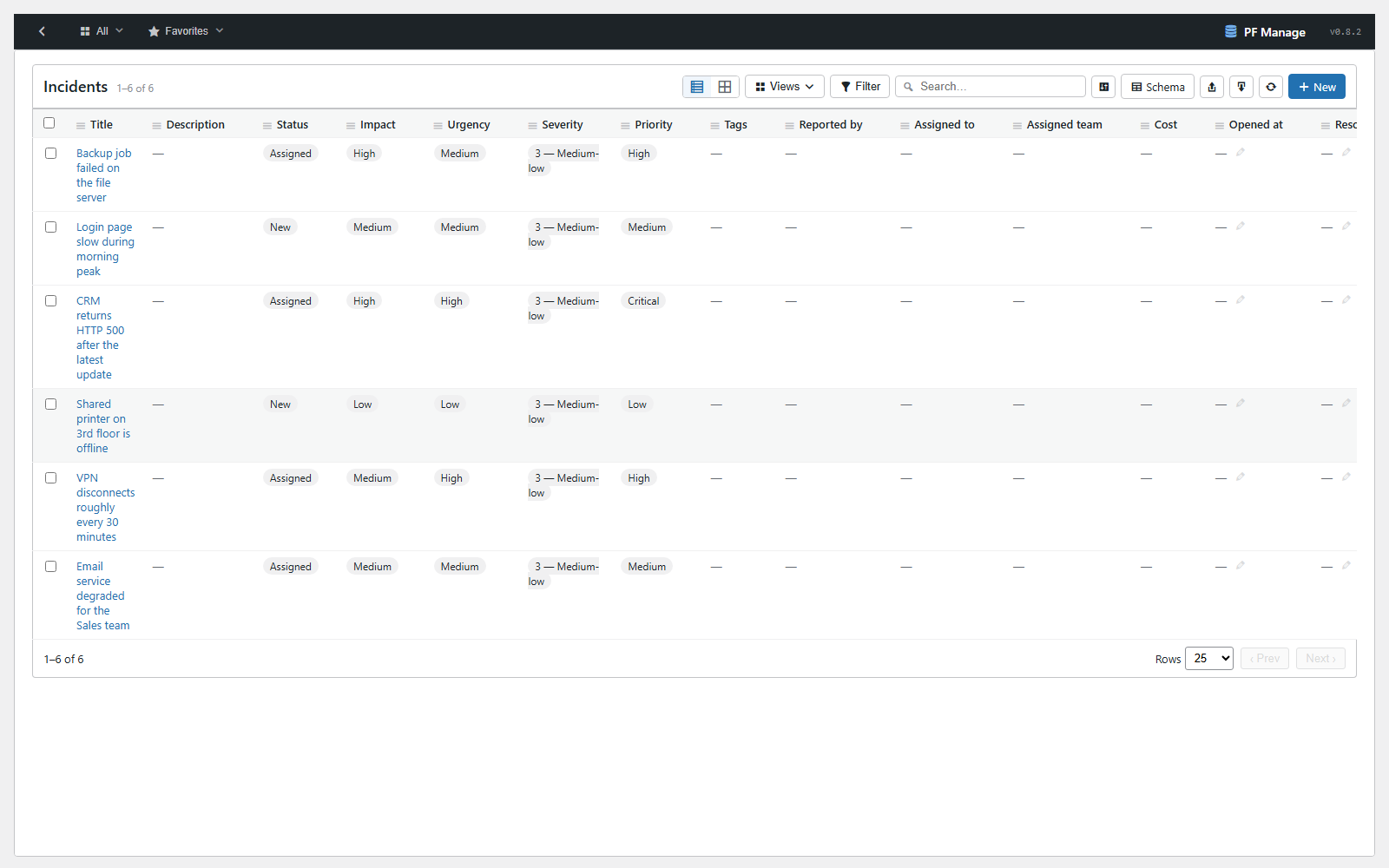
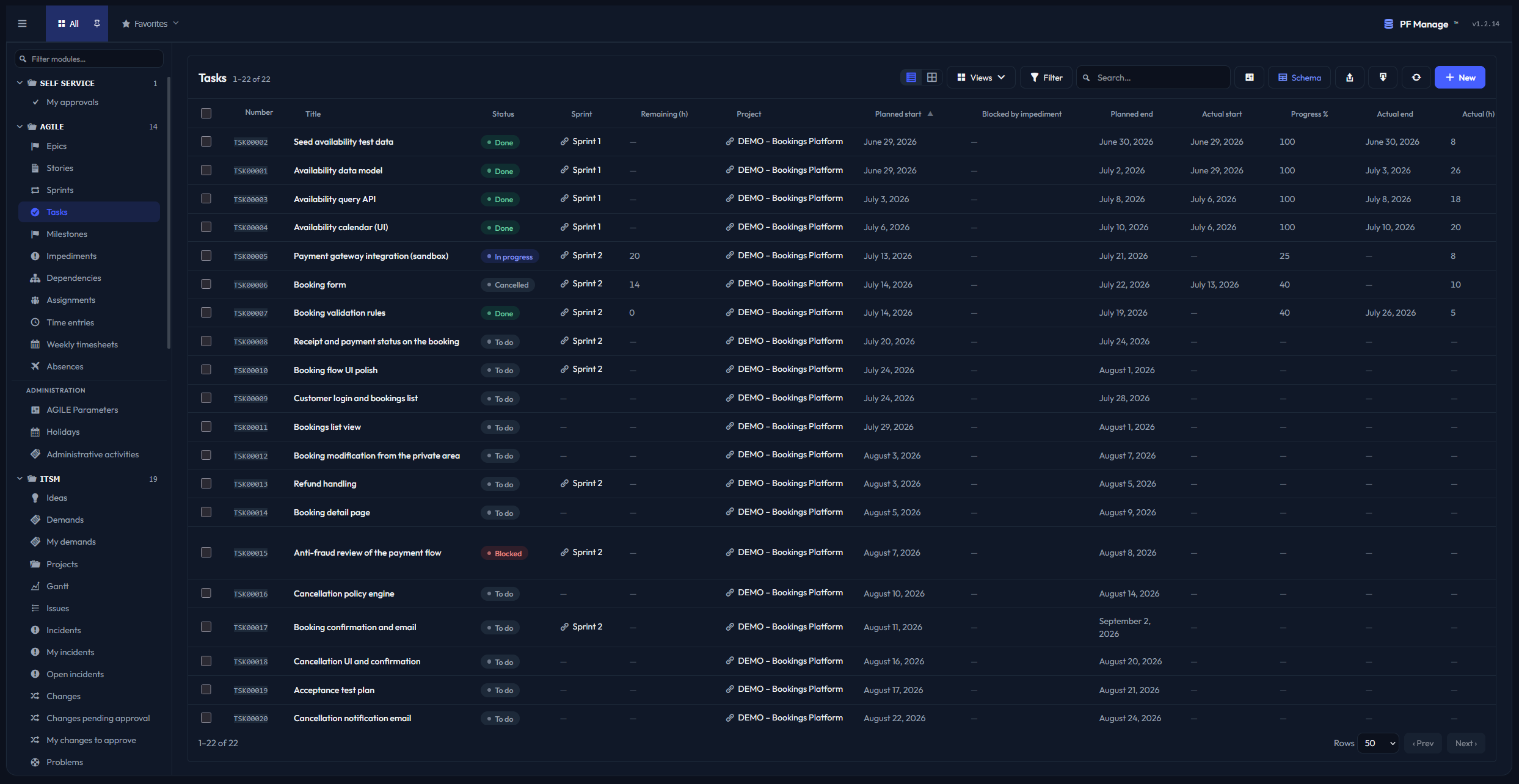
A ServiceNow-style low-code platform, native to WordPress. Without writing a line of code, model your processes, assets and services — entities, fields, forms, lists, permissions and business rules — and ship real applications (ITSM, CRM, asset/CMDB, service desk) inside your own WordPress. No external SaaS; your data never leaves your database.

  • Build real apps without writing code — model entities, fields, forms, lists, permissions and business rules
  • Single form layout per entity, sidebar of apps + modules — the WP-native equivalent of ServiceNow chrome
  • Event catalog (pfm.record.created, .changed, .deleted, …) that Workflow consumes natively
  • The Agent can design the entity, generate the form, and wire the events from a one-line description
WP-PFManagement entity / app view
wp-executor

wp-executor — run on your own machine

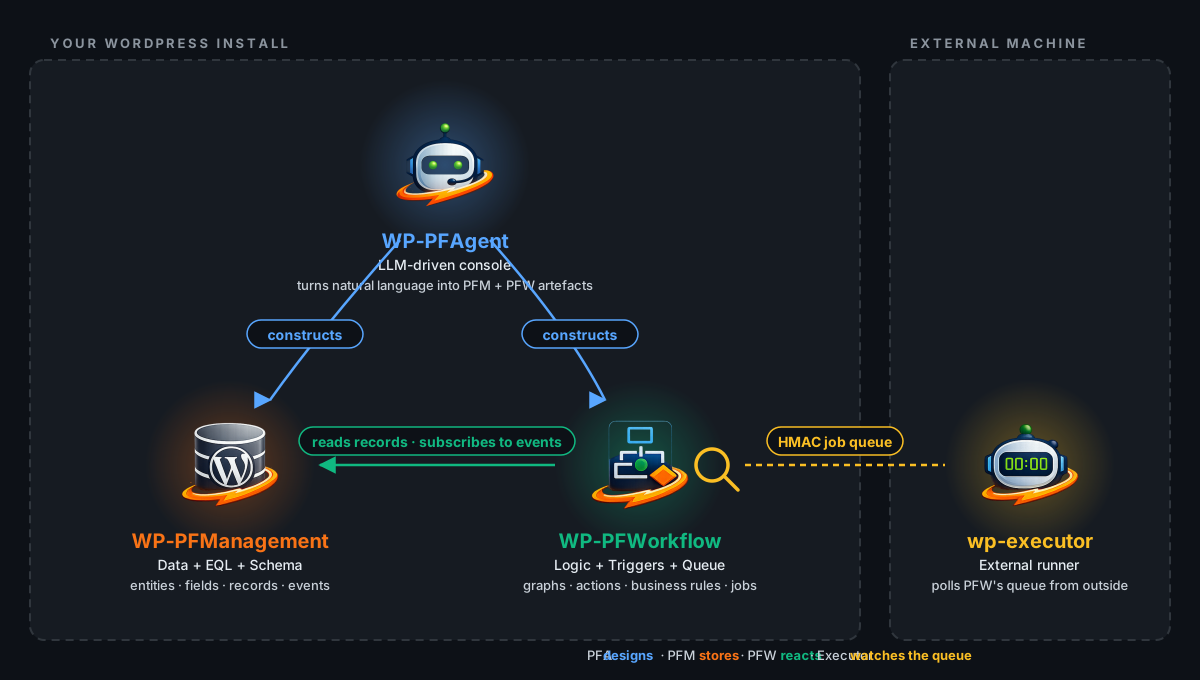
An open-source runner that takes your workflow events and runs them on your own machine, in your own tools — shell commands, scripts, the filesystem, your local apps and integrations. It bridges WordPress automation with your own environment: a workflow can trigger in WordPress and execute right where your tools live. Every action runs under a double allowlist you define — the capabilities it may use and the outbound network it may reach — so it does only what you permit. Dual-licensed MIT/Apache-2.0, free on GitHub; the WordPress side that publishes work to it runs either edition.

  • Runs your workflow events on your own machine — shell commands, scripts, the filesystem, your local apps and integrations
  • Bridges WordPress automation with your own environment: a workflow triggers in WordPress and executes right where your tools live
  • Open source (MIT / Apache-2.0): a standalone binary you run yourself, free on GitHub
  • Pulls work over a signed HMAC channel — no inbound port on your site (technical detail; you just run the binary)
Where wp-executor fits: your WordPress install runs the suite; an external machine runs the executor and pulls jobs over a signed queue

The visual editor

Drag triggers, conditions, AI calls, integrations onto the canvas. Connect them. Test inline. Hit Save.

WP-PFWorkflow editor screenshot

Live editor in WP-PFWorkflow. The same workflow runs on your server, on schedule or on event.

The Kanban board

Drag work across columns — committed, in progress, in review, done. Filter by sprint. Every card is a live record, not a sticky note.

WP-PFManagement Kanban board screenshot

Live board in WP-PFManagement. Move a card and the underlying record updates — no separate project tool.

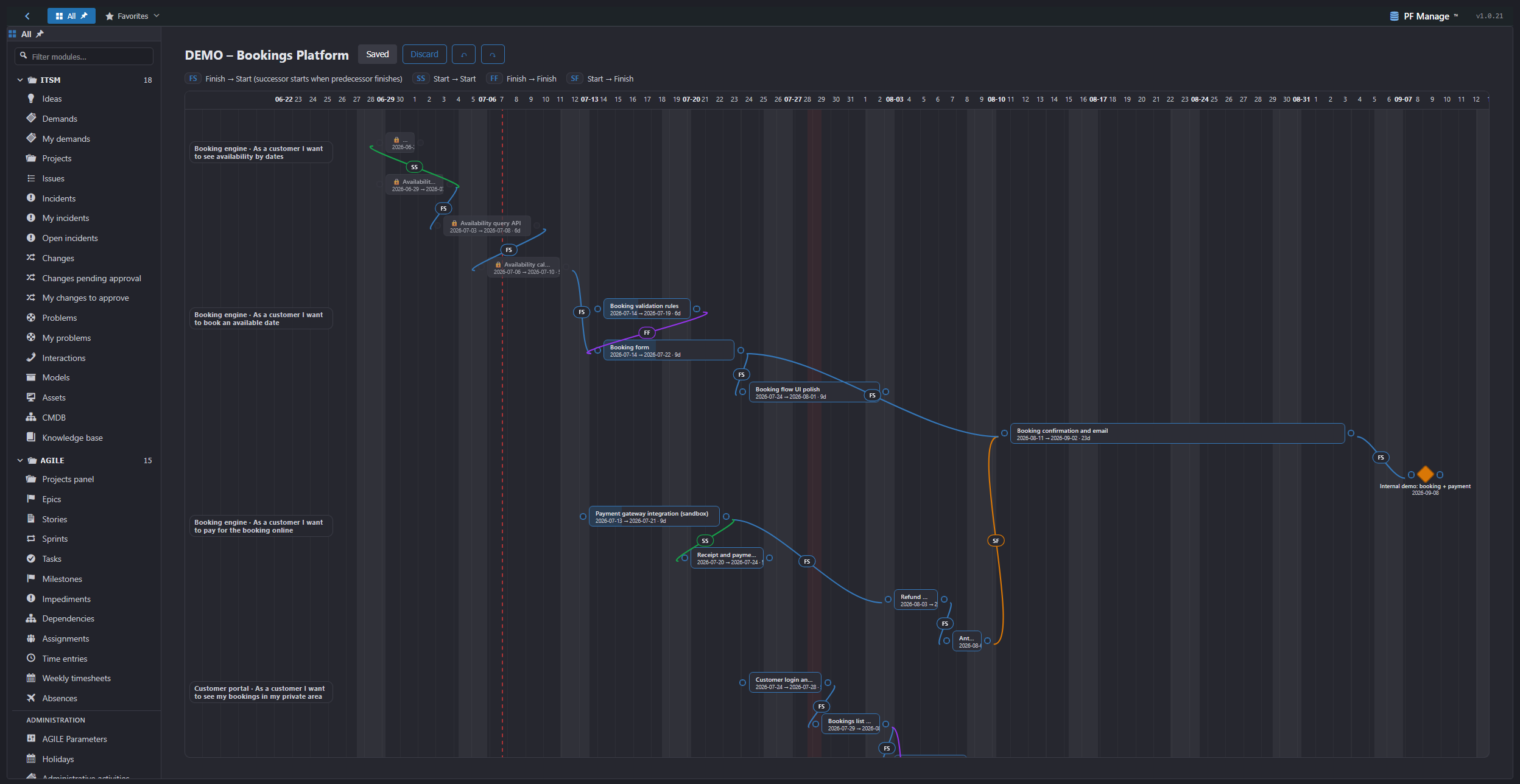
The Agile Gantt

Plan on a canvas where each task's width is its duration. Draw typed dependencies, drop milestones, right-click to connect.

WP-PFManagement Agile planning (Gantt) screenshot

Live planning in WP-PFManagement. Dependencies, milestones and dates are real records your workflows can act on.

A concrete example

Tell the Agent in plain English. The Agent uses Workflow tools to build it. You confirm. It runs.

01

1. You ask

"When a WooCommerce order is placed for over 200 €, ask GPT to draft a personalised thank-you note based on the customer's purchase history, send it via my SMTP, and log it as a note on the order."

02

2. The Agent drafts

It opens your existing setup, picks the right trigger (WooCommerce order paid), inserts a condition (total ≥ 200 €), an AI node (GPT, your account), an email node (your SMTP), and a Note node. Shows you the diagram.

03

3. You confirm. It runs

You click Activate. Every qualifying order from now on triggers the workflow. The execution timeline shows you every node, every input, every output, every retry. Replayable. Auditable.

Built for more than one instance

Serious work is not done on the site your customers use. Setyenv runs as a chain of instances: you build below, push up when it is ready, and refresh downwards from what is really running.

Dev
Where you build
Community · free
Pre
Where you verify
Community · free
Pro
What your business runs on
Enterprise

Sync pushes your work up: schema, configuration and workflows, chosen line by line from a real difference. Clone pulls down, so you develop against a faithful copy of what is running. WordPress core tables never travel in either direction, and secrets never leave the instance they belong to. Development and pre-production are not commercial use, so they run the free Community Edition: a whole chain costs one licence, for production.

Pricing

Enterprise Edition, for commercial use: a monthly or annual subscription and a single key for both plugins. Choose how many domains it covers; two or more earn a multi-domain discount. For personal or non-commercial use, the Community Edition is free.

Start with the Community Edition or the live demo, both free. If you then take an Enterprise subscription, you still have 14 days to change your mind, with a full refund if it is not for you. Any customer, anywhere.

Setyenv PF Pack

WP-PFManagement + WP-PFWorkflow
Monthly or annual
Monthly
1 domain
€17.00
per month
Register to buy

Free

Free · Community Edition and open source
Setyenv Community Edition
WP-PFManagement and WP-PFWorkflow with every feature and no key, free for personal and non-commercial use. Register and download them, or use the setyenv/setyenv Docker image. Should you ever need the Enterprise Edition, entering the key on that same installation is all it takes.
Free
 
Register and download free
WP-PFAgent
An AI agent that drives the engine in natural language. Register and download it free; it works with either edition of WP-PFWorkflow or WP-PFManagement.
Free
 
Register & download free
wp-executor
Runs your workflow events on your own machine and tools — shell, scripts, files. Free, open source (MIT / Apache-2.0).
Free
 
View on GitHub

* Only annual plans can add source-code access. Including the source code voids the right to a refund.

Obfuscated or source — your choice

Both editions ship with the code protected. On Enterprise annual plans you can add the readable source. Here is the honest trade-off, stated up front.

Obfuscated (standard)

The full, working plugin with its code protected. Install it, activate it, run it — everything works exactly the same. You just don't read or change the code.

The Community Edition is free. An Enterprise subscription comes with a full 14-day refund, no questions asked.

Source (annual add-on)

Everything above, plus the readable source code: audit it, adapt it for your own use, and deploy it on your own servers. You may not redistribute it — see the EULA.

No refund. Once you have the source you can't un-receive it, so adding source makes your account non-refundable — account-wide and permanent. We tell you before you buy.

Try it free

The Community Edition costs nothing and has every feature, and the live demo needs no install at all. If you take an Enterprise subscription, you still get 14 days to try it in production with a full refund if it is not for you — every customer, anywhere, no questions asked. Per our Refund Policy.

Source access, if you want it

Enterprise annual plans can add the readable source code: read it, audit it, adapt it for your own use. Not open source — see the EULA for terms.

Direct support

Email support in English and Spanish, 2 business day target response. Critical security issues prioritised.

WordPress 7 compatible

Tested against the latest two major WordPress releases. PHP 8.1+. No external SaaS dependency.

Common questions

When do I get the plugins?
Right after registering: download the Community Edition from your account, or pull the setyenv/setyenv Docker image. An Enterprise key is issued the moment you subscribe and emailed to you; enter it once and both plugins switch edition.
Do I need all three plugins?
No. WP-PFWorkflow runs on its own — it is the engine. WP-PFAgent is optional and adds the natural-language layer (you bring your own LLM keys). WP-PFManagement is the data layer; you can add it later. Each plugin provides value standalone, and they compound when combined.
What does "domain" mean in an Enterprise subscription?
One WordPress site — one domain — per activation. You choose how many domains your subscription covers, and covering two or more earns a multi-domain discount. You can move the key from one site to another by removing it from the first. The Community Edition has no domain limit.
What about my LLM bills?
WP-PFAgent uses your own provider keys (BYOK). Cost depends on the model you choose and how much you ask the agent. The plugin shows estimated cost per turn before running, and you can cap budgets per workflow. We never proxy your traffic — your keys talk directly to the provider.
Can I cancel?
Anytime, from your customer dashboard. Cancellation takes effect at the end of the current period — you keep the Enterprise Edition until then, and the site then continues as the Community Edition, with nothing paused. Every customer gets a full refund within 14 days, anywhere; full details in our Refund Policy.
Is this open source?
The agent (GPL-2.0) and the executor (MIT/Apache-2.0) are free and open source. The engine and the platform are commercial, source-available to licensees.
What happens to my data?
Workflows, executions, credentials and telemetry stay in your WordPress database. There is no Setyenv dashboard you log into — everything is your own admin. The portal at setyenv.com only handles licensing and downloads.
What is the difference between Community and Enterprise?
The key. Both editions are the same code with the same features. Community is free for personal and non-commercial use; Enterprise is the subscription for commercial use, and a single key licenses the engine and the platform. An installation without a key is Community.
Can I run it in Docker?
Yes. The setyenv/setyenv image on Docker Hub is a WordPress with the three plugins installed and activated, a built-in cron and updates through our channel. It starts as Community; for Enterprise, set SETYENV_LICENSE_KEY or enter the key in wp-admin.