














Cross-plugin integration
How the four pieces of the suite work together. While each plugin is useful on its own, they compound when installed together.
Architecture
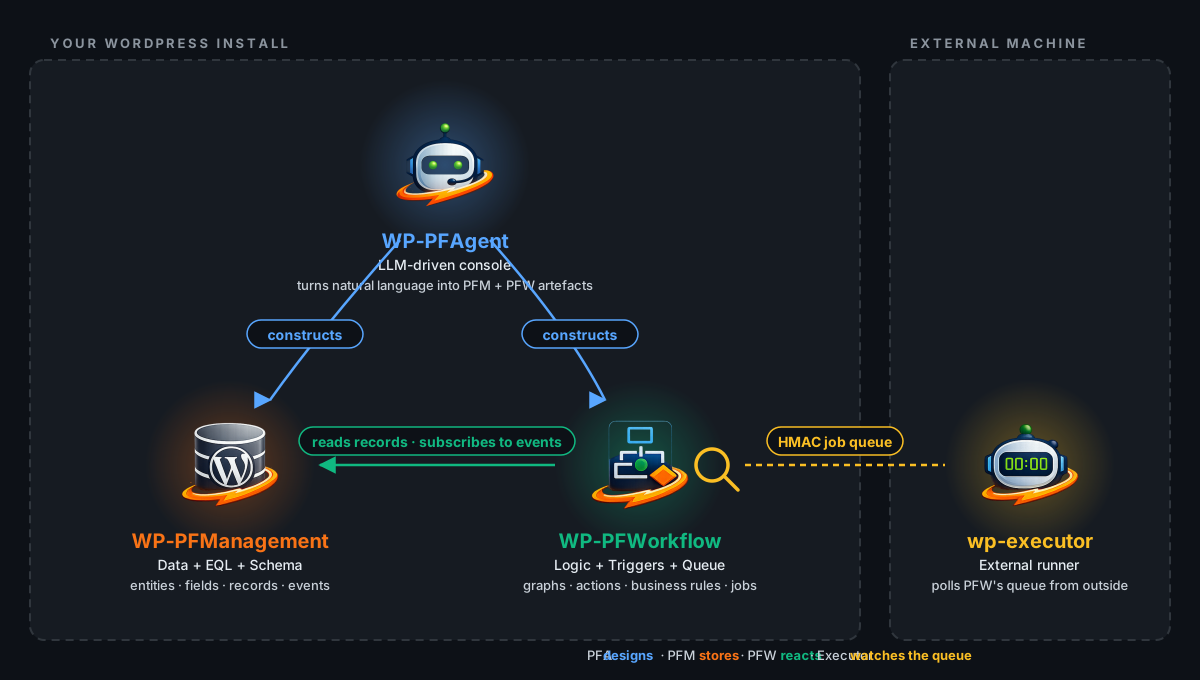
What each piece does
- WP-PFManagement (PFM) — the data layer. Defines entities, fields, forms and lists; emits record events.
- WP-PFWorkflow (PFW) — the logic layer. Subscribes to PFM events, runs workflow graphs, business rules and the action queue.
- WP-PFAgent (PFA) — the natural-language interface. Designs PFM entities and PFW workflows from a brief, using the plugins' public REST surfaces.
- wp-executor — the off-host runner (open-source binary). Polls PFW's HMAC-signed remote queue from outside and reports results back. PFW never initiates a connection to the executor.
End-to-end example. A single brief: "When a support ticket is created, assign it and send an email."
- PFA reads PFM's current entity catalog and PFW's node catalog, then proposes the workflow. Every change pauses at the side-effect confirmation gate for your approval before anything is written.
- PFW registers the trigger (
Ticket created) and the two actions (Send email,Assign user), and runs them when the trigger fires. - PFM stores the Ticket record and fires
record.created; PFW reacts and writes back the assignment. - If any action is a long-running or off-host job, PFW enqueues it on the remote queue. wp-executor, running on a host you operate, polls that queue, claims the job, runs it under its local capability allowlist, and posts the result back.
Integration points
| Integration | How it works |
|---|---|
| Agent ↔ Workflow | Agent uses the workflow plugin's public REST surface to read the node catalog and propose new workflows; every write goes through the confirmation gate. |
| Agent ↔ Management | Agent reads the entity catalog and proposes new entities, fields, or record changes through the management plugin's public REST surface; every write goes through the gate. |
| Workflow ← Management | Management record events (pfm.record.created, etc.) are first-class Workflow triggers. Workflow nodes can read and write Management records. |
| Management → Workflow | Per-record actions (buttons) trigger workflows. Business Rules dispatch workflows on conditions. |
| Workflow → wp-executor | Workflow enqueues host-side jobs (shell, file system, outbound HTTP) on the remote queue. The executor polls it and runs jobs under its own capability allowlist. |
Using all three together
The most powerful use case: describe a business process in natural language, and the agent builds it end-to-end:
- You: "Create a ticket system where high-priority tickets auto-assign to the support team and send a Slack notification".
- The agent proposes a Ticket entity in Management (fields: title, description, priority, status, assigned_to) — you confirm.
- It proposes a form for ticket creation — you confirm.
- It proposes a workflow that triggers on ticket creation, checks priority, assigns the user, and posts to Slack — you confirm.
- The system goes live with every change explicitly approved by you.
Licensing
WP-PFWorkflow and WP-PFManagement share one licence: the Community Edition needs no key, the Enterprise Edition needs one key for both. WP-PFAgent and wp-executor are open source.
| Component | What you can do alone | What you need the others for |
|---|---|---|
| WP-PFWorkflow only | Build workflow automations with the visual editor. | No agent assistance; no structured-data triggers. |
| WP-PFAgent only | Nothing useful — the agent designs workflows that the engine runs. | Requires WP-PFWorkflow installed. |
| WP-PFManagement only | Build structured-data apps with forms and lists. Event system fires but nothing reacts. | No workflow automation reacting to record events. |
| wp-executor only | Run host-side jobs published by a Workflow install you connect it to. | Requires WP-PFWorkflow as the controller. |